
Quick Camera Translator1.9.1 - App Store
You'll be able to see results in few seconds.
Publisher Description
*** Get the most powerful translator application with SPECIAL price for a limited time ***
******* PAY FOR ONLY ONCE *******
"Whenever seeing signposts, texts or even paragraphs in an unfamiliar language, use the iPhone/iPad camera with this application to get the translation quickly, easily and very conveniently."
"I can easily have an entire document translated into one of many different languages, just take a photo then boom!"
"I even never use translate feature I only use this app to recognize text from paper. You can set source language is English and destination language is English"
"This wonderful application takes you no time to get translation while other translators do with a few minutes.
Extremely useful for students, tourists, businessmen and people who learn foreign language."
"interesting ideal! I've tried English to Spanish and vice versa and it works perfectly. I'm impressed, especialy since this app only cost lest than a 1 and it translate a bunch of languages. I know another piece that costs almost 1 for 1 language which is ridiculous!! this app is very useful."
"very handy for when traveling round europe for roadsigns and menu's"
"My dad is bad with technology and I was set on the task of finding him a translation app which had a camera it needed to be easy to use and could translate portuguese. After downloading about 10 free apps I tried this one as it was the next cheapest and I'm glad I did. You don't have to make any extra payments it has loads of languages and is really straight forward to use! I've passed it onto my father who can use it no problem. Mission successful great app well worth the 69p!"
* Features:
- Multiple - language translation
- Get the translation most immediately
- Convenient and easy to use
- Very clean design, Retina display support
- Translate the whole page
* Instructions - 3 simple steps:
- Take the picture containing the words
- Crop the green frame toward the words
- Tap on OK button to get translation
* It s our pleasure to see all your feedback to hoangpx110488@gmail.com
~~~~~~~~~~~~~~~~~~~~~~~~~~~~~
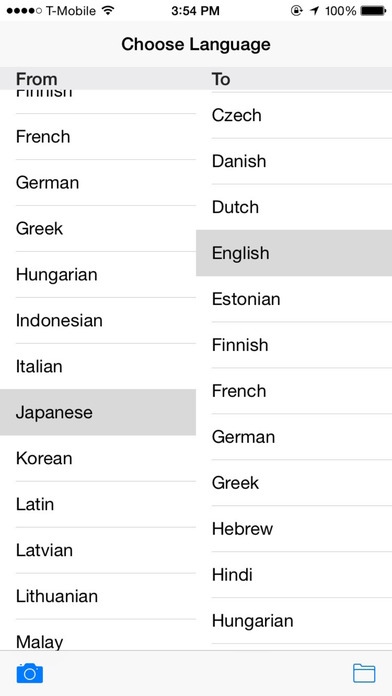
The input available languages (translate from):
BULGARIAN
CATALAN
CHINESE(SIMPLIFIED)
CHINESE(TRADITIONAL)
CROATIAN
CZECH
DANISH
DUTCH
ENGLISH
ESTONIAN
FINNISH
FRENCH
GERMAN
GREEK
HUNGARIAN
INDONESIAN
ITALIAN
JAPANESE
KOREAN
LATIN
LATVIAN
LITHUANIAN
MALAY
NORWEGIAN
POLISH
PORTUGUESE
ROMANIAN
RUSSIAN
SERBIAN
SLOVAKIAN
SLOVENIAN
SPANISH
SWEDISH
TURKISH
UKRAINIAN
~~~~~~~~~~~~~~~~~~~~~~~~~~
The output available languages (translate to):
ARABIC
BULGARIAN
CATALAN
CHINESE(SIMPLIFIED)
CHINESE(TRADITIONAL)
CROATIAN
CZECH
DANISH
DUTCH
ENGLISH
ESTONIAN
FINNISH
FRENCH
GERMAN
GREEK
HEBREW
HINDI
HUNGARIAN
INDONESIAN
ITALIAN
JAPANESE
KOREAN
LATVIAN
LITHUANIAN
MALAY
MALTESE
NORWEGIAN
PERSIAN
POLISH
PORTUGUESE
ROMANIAN
RUSSIAN
SERBIAN
SLOVAK
SLOVENIAN
SPANISH
SWEDISH
THAI
TURKISH
UKRAINIAN
VIETNAMESE
WELSH
Requires iOS 9.0 or later. Compatible with iPhone, iPad, and iPod touch.
About Quick Camera Translator
The company that develops Quick Camera Translator is Thu Trang. The latest version released by its developer is 1.9.1.
To install Quick Camera Translator on your iOS device, just click the green Continue To App button above to start the installation process. The app is listed on our website since 2012-03-07 and was downloaded 0 times. We have already checked if the download link is safe, however for your own protection we recommend that you scan the downloaded app with your antivirus. Your antivirus may detect the Quick Camera Translator as malware if the download link is broken.
How to install Quick Camera Translator on your iOS device:
- Click on the Continue To App button on our website. This will redirect you to the App Store.
- Once the Quick Camera Translator is shown in the iTunes listing of your iOS device, you can start its download and installation. Tap on the GET button to the right of the app to start downloading it.
- If you are not logged-in the iOS appstore app, you'll be prompted for your your Apple ID and/or password.
- After Quick Camera Translator is downloaded, you'll see an INSTALL button to the right. Tap on it to start the actual installation of the iOS app.
- Once installation is finished you can tap on the OPEN button to start it. Its icon will also be added to your device home screen.
Program Details
System requirements
Download information
Pricing
Version History
version 1.9.1
posted on 2012-03-07
Disclaimer
Official App Store Link
We do not host Quick Camera Translator on our servers. We did not scan it for viruses, adware, spyware or other type of malware. This app is hosted by Apple and passed their terms and conditions to be listed there. We recommend caution when installing it.
The App Store link for Quick Camera Translator is provided to you by apps112.com without any warranties, representations or guarantees of any kind, so access it at your own risk.
If you have questions regarding this particular app contact the publisher directly. For questions about the functionalities of apps112.com contact us.
